


1 Using MLWorks interactively
Specifically, suppose you enter the following:
MLWorks> val a = if b>7 then 9 else false;This line is wrong in two ways: the integer
b has not been defined, and the whole expression is ill-typed. MLWorks alerts you to the error by bringing up a new window, the error browser.
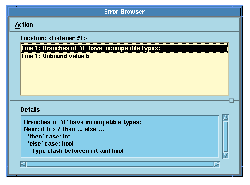
Figure 1.3 The MLWorks error browser.
Note: If you do not like the error browser, you may switch it off in the Preferences > General menu on the MLWorks podium. Errors will then be reported directly in the listener window.
The error browser has two windows. The top window shows a list of the errors that have been encountered. Any of these may be selected, and the bottom window shows more details, if any are available, of the selected error. In this case, the error browser is initially showing details of the type clash it has detected, including what the two different types are that it cannot unify. If we select the other error in the top window ('Unbound value b'), there is no more to say about it, and the error browser simply repeats this information in the lower window.
You can thus look through all the errors in turn, editing the declaration in the listener window as you go, before trying to evaluate the declaration again. You can do this in the usual way (pressing the Return key or the Evaluate button), or by selecting Action > Redo on the error browser window. MLWorks tries to evaluate the line as amended, and the error browser disappears. The Action > Close menu item will close the error browser, copying the error report to the listener and giving a new prompt.
The error browser's remaining menu item, Action > Edit, causes the part of the declaration where the error was detected to be highlighted in the listener window.
Generated with Harlequin WebMaker