


4 Examining Objects
MLWorks> datatype btree = leaf of int | node of (btree * btree);
MLWorks> node (leaf 1, node (node (leaf 2, leaf 3), leaf 4));
Now select Action > Inspect. An inspector appears with details of the tree just defined. The bottom pane of the inspector includes a graphical representation of the tree, showing only the root node; clicking on this expands the graph to show the children. (You may want to re-size the inspector using your window manager.) You can click on any node to select it, and clicking again will further expand that node.
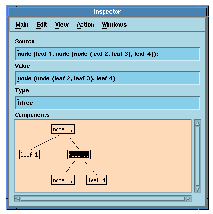
Figure 4.1 The MLWorks inspector.
Generated with Harlequin WebMaker