


4 Examining Objects
The history tool lists all items accepted by all listeners, and also all items loaded into the environment. The items are listed in the order in which they were added to the environment.
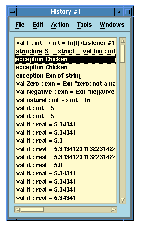
Figure 4.5 The MLWorks history tool.
Like the context browser, the history tool keeps itself up to date with newly evaluated input automatically.
Action > View Source shows the source code for an item selected from the list. For an item that was loaded from the filesystem rather than typed into the listener, this shows the load operation which brought the item into MLWorks, including the file or module that contained the item.
Edit > Remove Duplicates searches for items that occur more than once and deletes all but one of them from the list. (Note that the listener's History menu never records duplicate entries.)
Edit > Copy allows you to copy an item from the list in order to paste it into some other MLWorks tool; Edit > Delete deletes the currently selected item; Edit > Delete All deletes all of them.
Generated with Harlequin WebMaker