


1 Using MLWorks interactively
1.13 Printing extra information in the listener
As we have seen, the listener has a read-eval-print loop, meaning that it always prints the results of evaluating the expressions you type into it. Evaluation always causes a given identifier or it to be bound to the value computed, thus the result printed for all evaluations is the value and the type of the value bound.
MLWorks allows you to control the form of this printed result, and also to print more information in the result of each evaluation, via the Usage > Tool Settings menu. Other tools in the interactive environment also use this menu which allows you to change the view in those tools.
As an introduction to these controls, we now look at how to change the form of a certain kind of result: sequence values. To do this we must go to the dialog produced by the Usage > Tool Settings > Value Printer menu item. The dialog presents a column of text and check boxes with which you can control various settings of the value printer that is used to print out results. The settings in this dialog can also be controlled using the structure Shell.Options.ValuePrinter, which is built in to the interactive context. For full details of this (and other, similar options), see the MLWorks Reference Manual.
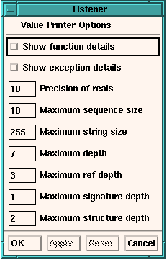
Figure 1.12 The Value Printer Options dialog for the listener.
After changing value printer settings in the Value Printer Options dialog, you can apply them with the Apply button. Reset returns the settings to what they were when you last clicked Apply. If you have not yet clicked Apply, it returns the settings to what they were when you invoked the dialog.
The Maximum sequence size box controls the maximum number of elements to print for sequence values. Sequences longer than this are elided. The sequence size must be an integer; the default is 10.
With Maximum sequence size set to 3:
MLWorks> val l = [ 1, 2, 3, 4, 5, 6 ];
val l : int list = [ 1, 2, 3, ..]
MLWorks>
You can also invoke the Value Printer Options dialog in the inspector and in the compilation manager (which we shall see in Chapter 2, "Building Applications"). Notice that when you do so, the title of the dialog shows which tool owns it.
This concept of ownership means that changes to values do not take place throughout the GUI environment -- different tools keep their own value-printing settings. Thus, if you set Maximum sequence size to 3 in the listener, the value-printing behavior for sequence values will be not changed in any other tools you have created.
The inspector is a little different: though you may make duplicates of it (with Usage > Duplicate Tool), MLWorks considers there to be only one inspector tool, and so all copies of it use the same value-printing values. What is more, the inspector does not inherit the value-printing values of the listener from which it was invoked, so inspecting list l by choosing Usage > Inspect in a listener with elided list value printing does not produce an elided list in the inspector's Value field.