


2.3 Basic use of the MLWorks project system
2.3.9 Summary of the basic compile and load operations
The MLWorks compilation system converts between source files, object files, and loaded objects in the interactive environment as shown in Figure 2.8.
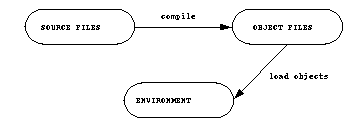
Figure 2.8 Relationship between source and object files in MLWorks.
In summary, the following steps are required to compile and load an application from scratch using the project system:
- 1. Create and save a new project with File > New Project and File > Save Project As...
- 2. Specify the source path of the target source files by clicking on Set Source Path in the project workspace
- 3. Specify the names of the current target source files by clicking on Set Target Sources in the project workspace
- 4. Specify a location for the object files that are built on compilation by clicking on Set Objects Location in the project workspace
- 5. Specify a mode of compilation by choosing Project > Properties > Modes
- 6. Compile the application by choosing Project > Compile Target Sources
- 7. Load the application into the listener by choosing Project > Load Targets