


2 Building Applications
require, which can be used in source files to make a top-level declaration of the form
require "<source-file>";This tells the compiler that the present file uses values or functions defined in
<source-file>, which should therefore be compiled first.
The require reserved word takes a single string argument, which is the name of an MLWorks unit (for program units see Section 2.4; for the moment, you can think of a unit name as being the name of a source file without the .sml extension). Any require declarations must be at the start of the file, before any other top-level declarations, and the argument must be a string constant, not just an ML expression of type string.
The effect of a require declaration is to import the declarations from the specified file into the current file. For example, suppose you have three files, xval.sml, yval.sml and sumxy.sml, all in the same directory, as follows:
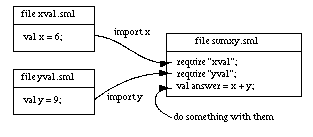
Figure 2.1 A program comprised of three files.
Then the effect of the file sumxy.sml is to bind the identifier answer to the value 15.
Note: A file may use declarations from files it imports with require, but this relation is not transitive. Suppose you change xval.sml to require another file, zval.sml, to compute its value of x:
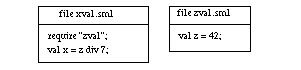
Figure 2.2 Another dependency is introduced.
Then sumxy.sml could still use the value of x, but not the value of z from zval.sml, as it does not explicitly require the latter file. In this respect, the MLWorks require extension is rather like the ML construction
local <declarations> in ... end
Generated with Harlequin WebMaker