


5 Debugging
To use step mode, type a declaration in the usual way at the listener prompt and press the listener's Step button. The declaration typed into the listener will be evaluated one step at a time, entering the stack browser each time a new function call is entered. Only calls to functions that were compiled in debugging mode appear are stepped.
For instance, with the definitions from the last section still in force, type the following and press Step:
efact 10 + ofact 11;The stack browser appears, and the text field at the top shows this is because
efact has been entered. The lower pane shows the details of the function call, and the upper pane the value of any arguments passed; in this case there was only one argument.
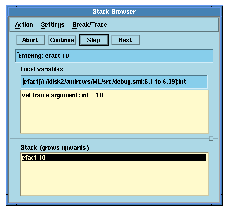
Figure 5.3 Stack browser invoked in step mode.
As well as the usual Abort button, there are now active buttons marked Continue, Step and Next. The Step button will continue the evaluation until another function call is entered -- in this case, ofact. At each step the stack browser shows the local variables and function arguments to the top function on the stack, and the file viewer (or Emacs server) moves to the definition of the relevant function, which is highlighted.
The Next button will continue the evaluation until the function currently at the top of the stack returns: in the present case, it will finish the evaluation of efact 10, and stop again at the call to ofact 11. At any point, pressing Continue will switch off step mode and continue until the end of the evaluation.
Generated with Harlequin WebMaker