


1 Using MLWorks interactively
To create a listener, choose Tools > Listener from the podium (or most other MLWorks windows). A listener appears, with the following prompt:
MLWorks>
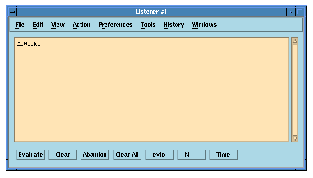
Figure 1.2 The MLWorks listener.
You can exit any listener window with File > Close or with the function Shell.exit.
At the heart of the listener is a read-eval-print loop which reads input typed at the prompt, evaluates it, and prints the result. If you type an expression, the result is just the value of the expression:
MLWorks> (7 * 4) - 3;
val it : int = 25
MLWorks>
Remember to terminate each line of input with the Return (or Enter) key -- in this example, after the semi-colon. MLWorks does not read the line until it is terminated in this way, or equivalently by pressing the Evaluate button at the bottom of the listener.
Note: The MLWorks system compiles all code, never interpreting as some other languages, such as Lisp, do. The listener, with its Lisp-like read-eval-print operation model, may seem like an interpreter, but in fact everything it accepts is evaluated by being compiled down to native code.
Note: In Standard ML, an expression encountered at top level is treated as an implicit declaration, binding the identifier it to the given expression. From here on, when we refer to a "declaration" typed in the listener, we include an expression typed at top level. The result of evaluating an expression, shown above, is in fact just a special case of the evaluation of a declaration, which we examine next.
If you type an explicit declaration in the listener, MLWorks binds the identifier to the given value and verifies the declaration and its type. For example, we can bind the identifier five to the value 5, declare an exception Fact, and define fact to be the usual factorial function:
MLWorks> val five = 5;
val five : int = 5
MLWorks> exception Fact;
exception Fact
MLWorks> fun fact 0 = 1
				| fact n =
						if n<0 then raise Fact
						else n * fact (n-1);
val fact : int -> int = fn
MLWorks>
The last example shows another feature of the listener, namely that it accepts declarations typed over multiple lines. It reads and parses lines in turn as they are typed, but it does not attempt to evaluate a declaration until it encounters the semi-colon that terminates the declaration. When MLWorks reads a line containing the terminating semi-colon, it interprets everything since the last evaluation as a declaration (or series of declarations).
Once a value has been bound to an identifier, that binding holds in your MLWorks session unless it is overridden by a later binding.
The binding can be used in subsequent declarations:
MLWorks> fact five;
val it : int = 120
MLWorks> val five = 6;
val five : int = 6
MLWorks> fact five;
val it : int = 720
MLWorks>
If you type a declaration in the window and press the Time button, MLWorks will evaluate the declaration as normal, and also give a line of information about how long the evaluation took. For much more complicated profiling of ML functions, you can use the MLWorks profiler tool, invoked with the Profile button. There is also programmatic interface to the profiler in the
MLWorks.Profile and Shell.Profile structures: for details, see the MLWorks Reference Manual.
Generated with Harlequin WebMaker