


2.4 Further uses of the MLWorks project system
2.4.2 Setting the library path
Your application may depend on a number of precompiled object files from another source. Such object files are known as library files. The object files of the Basis library are an example of a library. You can inform the project of the location of library files by choosing Project > Properties > Library Path from the project workspace menubar. The "Set Library Path" dialog appears:
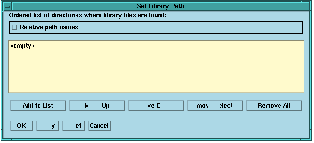
Figure 2.10 Setting the library path.
For example, imagine that our application needs some of the functions defined in the Basis library. We can point the project system to the object files defining these functions by clicking on Add to List and selecting the basis directory from the file selection dialog that appears. As with other dialogs for specifying path names there is a checkbox for using relative path names, and the choices for the library path are not added to the project file until you click on Apply or OK.