


4 Examining Objects
4.2 Examining values: the inspector
Let us take a closer look at the inspector. In a listener window, type the following definition of a binary tree (MLWorks' verification output is omitted):
MLWorks> datatype btree = leaf of int | node of (btree * btree);
MLWorks> node (leaf 1, node (node (leaf 2, leaf 3), leaf 4));
Now select Usage > Inspect. An inspector appears with details of the tree just defined. The bottom pane of the inspector includes a graphical representation of the tree, showing only the root node; clicking on this expands the graph to show the children. (You may want to re-size the inspector using your window manager.) You can click on any node to select it, and clicking again will further expand that node.
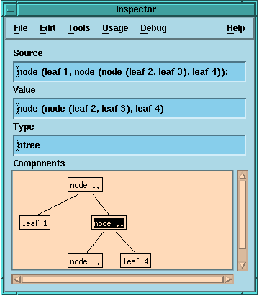
Figure 4.1 The MLWorks inspector.